
Your phone buzzes. Then again. And again.
Maybe it’s a group chat planning a weekend trip. Maybe it’s coworkers sending messages long after office hours. Or perhaps it’s that one friend who replies with six separate texts instead of one message.
At some point, constant notifications stop being helpful and start becoming distracting.
That’s where the Hide Alerts feature in iMessage comes in. It’s one of those simple iPhone tools that many people accidentally discover, tap once, and then forget exists. Yet it can make a surprising difference in how you manage your messages.
The best part? You don’t have to block anyone, leave a group chat, or turn off notifications for every conversation. You can silence specific chats while keeping everything else working normally.
Table of Contents
- What Is Hide Alerts in iMessage?
- How Hide Alerts Actually Works
- How to Turn On Hide Alerts
- How to Turn Off Hide Alerts
- Why People Use Hide Alerts
- Hide Alerts vs Do Not Disturb
- What Happens After You Hide Alerts
- Common Situations Where Hide Alerts Helps
- Things Hide Alerts Does Not Do
- Why You Might Miss Important Messages
- How to Tell If a Chat Has Hide Alerts Enabled
- Making Notifications Work for You
- Final Thoughts
What Is Hide Alerts in iMessage?
Hide Alerts is an iPhone feature that silences notifications from a specific conversation.
When enabled, messages still arrive normally. They appear inside the Messages app just like any other text. The sender isn’t blocked, and they don’t know you’ve muted the conversation.
The difference is that your phone stops notifying you every time a new message arrives from that chat.
No sound.
No vibration.
No banner notification.
It’s essentially a quiet mode for a single conversation.
Think of it like putting one chat on silent while everything else continues as normal.
How Hide Alerts Actually Works
A lot of people assume Hide Alerts deletes messages or prevents texts from arriving.
It doesn’t.
The conversation remains active. New messages continue to come through. Photos, videos, voice notes, and links still arrive without any issues.
The only thing that changes is how your iPhone reacts when those messages show up.
For example, imagine you’re in a family group chat with twenty relatives discussing holiday plans. Messages arrive every few minutes throughout the day.
Without Hide Alerts, your phone might light up constantly.
With Hide Alerts enabled, the conversation continues, but your phone stays quiet until you’re ready to check it.
It’s a small change that can feel surprisingly freeing.
How to Turn On Hide Alerts
Apple keeps the process fairly simple.
Open the Messages app and find the conversation you want to mute.
Swipe left on the conversation.
You’ll see options appear.
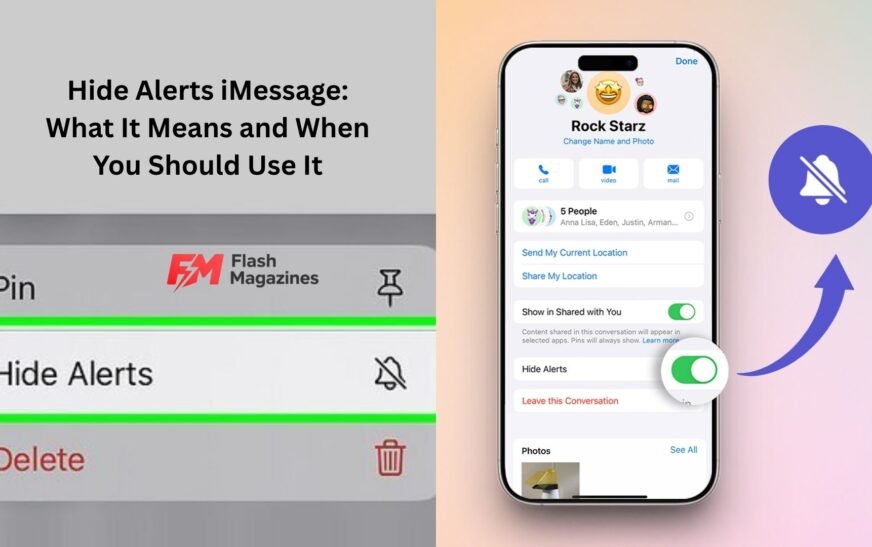
Tap the purple bell icon with a line through it.
Once activated, a small crossed-out bell appears beside that conversation.
That’s it.
The chat is now muted.
Another method works directly inside the conversation.
Open the chat, tap the contact or group name at the top, then enable Hide Alerts from the conversation settings.
Both methods accomplish the same thing.
How to Turn Off Hide Alerts
Eventually, most people want notifications back.
Maybe the project discussion becomes important again. Maybe vacation plans are finalized and you need updates.
To disable Hide Alerts, simply repeat the same process.
Swipe left on the conversation and tap the bell icon again.
The crossed-out bell disappears, and notifications return immediately.
You won’t lose any messages that arrived while alerts were hidden. They’ll still be waiting in the conversation.
Why People Use Hide Alerts
Let’s be honest.
Not every text message deserves your immediate attention.
Some conversations are useful but not urgent.
Others become overwhelming because of volume rather than importance.
Hide Alerts gives you a middle ground.
Instead of blocking someone or leaving a group chat entirely, you can quietly reduce the interruptions.
Students often use it during exam periods.
Remote workers use it to separate personal time from work discussions.
Parents sometimes mute active school-parent groups that generate hundreds of messages every week.
One person I know muted a fantasy football group chat because members were sending updates at midnight during game days. The conversation wasn’t bad. It was simply too active.
Hide Alerts solved the problem instantly.
Hide Alerts vs Do Not Disturb
People often confuse these two features.
They’re related but very different.
Hide Alerts affects one specific conversation.
Do Not Disturb affects notifications across your device.
Imagine you’re waiting for an important call from a family member but want to silence a noisy group chat.
Using Do Not Disturb would block everything.
Using Hide Alerts targets only the conversation causing the distraction.
That’s why many iPhone users prefer it. It offers more control without completely disconnecting from notifications.
You stay reachable while reducing unnecessary interruptions.
What Happens After You Hide Alerts
Several things continue working normally after enabling Hide Alerts.
Messages still arrive.
The sender can still contact you.
You can reply whenever you want.
Photos and attachments still download.
Message history remains untouched.
The sender receives no notification indicating they’ve been muted.
From their perspective, nothing has changed.
This is important because it allows you to manage your attention without creating awkward social situations.
No explanations required.
No hurt feelings.
No dramatic exits from group chats.
Just peace and quiet.
Common Situations Where Hide Alerts Helps
Some situations practically seem made for this feature.
Group chats are probably the biggest example.
Anyone who’s been added to a wedding planning group, sports team discussion, neighborhood chat, or extended family thread knows how quickly notifications can pile up.
Another common scenario involves work messages.
Maybe your coworkers communicate through iMessage. During office hours that’s fine.
At night? Not always.
Muting the conversation lets you maintain healthier boundaries without ignoring messages entirely.
Dating can create another interesting use case.
Sometimes you’re talking to someone new and messaging frequently. Notifications arrive every few minutes, making it difficult to focus on work or study.
Muting temporarily can help restore balance while keeping the conversation open.
Even hobby groups can become overwhelming.
Gaming communities, book clubs, fitness groups, and travel planning chats often generate far more notifications than most people expect.
Things Hide Alerts Does Not Do
Because the name sounds somewhat mysterious, many users assume Hide Alerts does more than it actually does.
It doesn’t block contacts.
It doesn’t stop messages from arriving.
It doesn’t delete conversations.
It doesn’t remove someone from a group chat.
It doesn’t hide messages from the Messages app.
It also doesn’t make you invisible.
People can still see message delivery statuses and continue texting you normally.
Hide Alerts is simply a notification management tool.
Nothing more.
Nothing less.
Understanding this prevents a lot of confusion later.
Why You Might Miss Important Messages
There is one downside.
If you mute a conversation and forget about it, important information can slip through.
That family group chat might suddenly contain details about a schedule change.
The work conversation you muted could include tomorrow’s meeting location.
A friend may send something time-sensitive that gets buried among less important messages.
This doesn’t mean Hide Alerts is a bad idea.
It just means you should use it thoughtfully.
Some people check muted conversations once or twice daily to avoid missing anything significant.
That habit usually works well.
You get fewer interruptions while staying informed.
How to Tell If a Chat Has Hide Alerts Enabled
Apple provides a simple visual indicator.
Look beside the conversation in your Messages list.
If you see a bell icon with a slash through it, Hide Alerts is active.
This little symbol can save you from confusion.
Many users forget they muted a conversation months earlier and wonder why notifications stopped appearing.
A quick glance at the Messages list often reveals the answer immediately.
It’s worth checking whenever notifications seem unusually quiet.
Making Notifications Work for You
One of the smartest ways to use a smartphone is to decide which alerts deserve your attention.
Not every notification should carry the same priority.
A text from your spouse might matter more than a casual group discussion.
A message from your boss could be more urgent than a weekend meme exchange.
Hide Alerts helps create those distinctions.
Instead of letting every conversation compete equally for your attention, you decide what deserves an immediate response and what can wait.
That level of control becomes increasingly valuable as our phones become busier.
The goal isn’t to ignore people.
It’s to prevent constant interruptions from controlling your day.
A quieter phone often leads to better focus, better productivity, and sometimes even less stress.
Final Thoughts
Hide Alerts in iMessage is one of Apple’s most practical yet underrated features. It gives you a way to silence noisy conversations without blocking people, leaving groups, or turning off all notifications.
Messages still arrive. Conversations remain active. Relationships stay intact.
The only thing that changes is the constant stream of alerts competing for your attention.
Whether you’re dealing with an active family chat, nonstop work messages, or a group conversation that never seems to sleep, Hide Alerts offers a simple solution.
Sometimes the best notification is the one you don’t hear.