

Storage sizes seem simple until you’re standing in a store comparing hard drives or checking your cloud storage and wondering where all your space went.
You buy a 1TB drive expecting exactly 1,000 gigabytes of usable storage, then your computer shows a different number. Suddenly, a straightforward measurement feels confusing.
The good news is that understanding gigabytes in a terabyte isn’t difficult. Once you know the difference between how manufacturers measure storage and how computers calculate it, everything starts to make sense.
Whether you’re buying a laptop, upgrading your phone, choosing cloud storage, or simply curious about digital storage, knowing how gigabytes and terabytes relate can save you money and help you make smarter decisions.
Table of Contents
- What Is a Gigabyte?
- What Is a Terabyte?
- How Many Gigabytes Are in a Terabyte?
- Why Different Sources Show Different Numbers
- Gigabytes vs Terabytes in Everyday Life
- How Much Data Fits in One Terabyte?
- When Do You Need a Terabyte of Storage?
- Common Storage Sizes Compared
- Understanding Cloud Storage Measurements
- Simple Ways to Remember the Conversion
- Final Thoughts
What Is a Gigabyte?
A gigabyte, usually written as GB, is a unit used to measure digital storage.
Think of it as a container that holds data. Photos, videos, documents, apps, games, and operating systems all take up storage space measured in gigabytes.
To put things into perspective:
- A high-quality photo might use 3–10 MB.
- A movie could require several GB.
- A modern video game may take 50–150 GB or more.
Years ago, having a 100GB hard drive felt enormous. Today, many smartphones come with 128GB or 256GB as standard storage options.
That’s because our files have become much larger. Higher-resolution cameras, 4K videos, larger software applications, and cloud backups all consume more space than they used to.
What Is a Terabyte?
A terabyte, abbreviated as TB, is a larger storage unit.
It’s essentially the next major step up from a gigabyte.
As digital content continues growing, terabytes have become common in laptops, desktop computers, gaming consoles, external drives, and cloud storage services.
A few years ago, only professionals dealing with video editing or large databases regularly talked about terabytes. Now, many everyday users own devices with 1TB or more of storage.
If gigabytes are buckets, terabytes are swimming pools.
That’s not a technical definition, of course, but it helps illustrate the scale difference.
How Many Gigabytes Are in a Terabyte?
Here’s the answer most people are looking for:
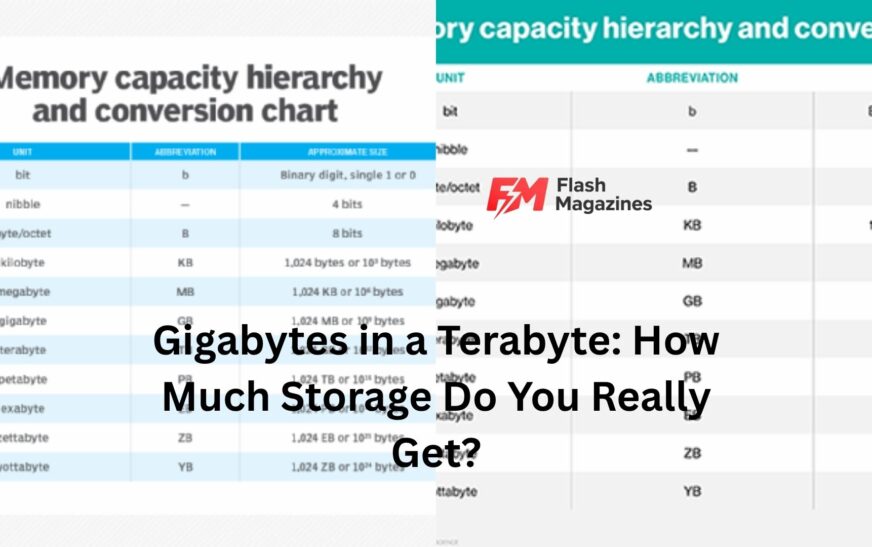
1 terabyte (TB) equals 1,000 gigabytes (GB).
This is the decimal measurement system used by storage manufacturers.
So:
- 1 TB = 1,000 GB
- 2 TB = 2,000 GB
- 4 TB = 4,000 GB
- 8 TB = 8,000 GB
Simple enough.
However, here’s where things become slightly confusing.
Computers often calculate storage using a binary system instead of the decimal system. In binary measurements:
1 TB equals 1,024 GB.
Both numbers are technically correct depending on which system is being used.
That’s why you may see different figures online or notice that your computer displays storage differently than the number printed on the box.
Why Different Sources Show Different Numbers
Let’s be honest. This is the part that frustrates many people.
Imagine buying a 1TB hard drive. The packaging says 1TB, but when you connect it to your computer, available storage appears closer to 931GB.
At first glance, it feels like you’ve lost storage space.
You haven’t.
The discrepancy comes from different counting methods.
Storage manufacturers use decimal calculations:
- 1 KB = 1,000 bytes
- 1 MB = 1,000 KB
- 1 GB = 1,000 MB
- 1 TB = 1,000 GB
Operating systems traditionally use binary calculations:
- 1 KB = 1,024 bytes
- 1 MB = 1,024 KB
- 1 GB = 1,024 MB
- 1 TB = 1,024 GB
When your computer interprets a manufacturer’s decimal measurement through a binary system, the displayed number appears smaller.
Nothing is missing. The numbers are simply being translated differently.
Gigabytes vs Terabytes in Everyday Life
Storage measurements become easier to understand when connected to real-world examples.
Imagine you have a smartphone with 128GB of storage.
That might be enough for thousands of photos, dozens of apps, downloaded music, and several videos.
Now multiply that storage nearly eight times.
You’re approaching a terabyte.
A 1TB drive can comfortably hold years of personal photos, large software libraries, extensive document collections, and plenty of entertainment content.
For many families, one terabyte can store memories collected over several years.
That’s why external hard drives and cloud services often start at 1TB. It provides enough room for most users without becoming unnecessarily expensive.
How Much Data Fits in One Terabyte?
The exact amount depends on file sizes, but practical examples make the concept easier to grasp.
A 1TB drive might hold approximately:
- 250,000 photos at around 4MB each
- 250 full-length HD movies
- Hundreds of thousands of documents
- Thousands of hours of music
- Several large video games
Of course, not everyone uses storage the same way.
A photographer shooting in RAW format may fill a terabyte much faster than someone who mainly stores spreadsheets and PDFs.
Similarly, a gamer can use hundreds of gigabytes with just a handful of modern titles.
Call of Duty, Microsoft Flight Simulator, and other large games can individually consume over 100GB.
Storage disappears surprisingly fast when dealing with modern content.
When Do You Need a Terabyte of Storage?
Not everyone needs 1TB.
Some people use cloud services extensively and keep very few files locally. Others primarily browse the web and stream content rather than downloading it.
For those users, 256GB or 512GB may be sufficient.
A terabyte becomes valuable when you regularly work with large files.
You might benefit from 1TB or more if you:
- Store lots of family photos
- Download movies and TV shows
- Play modern video games
- Edit videos
- Work with large design files
- Keep extensive backups
Here’s a common scenario.
A parent starts saving photos from birthdays, vacations, graduations, and family events. A few years later, thousands of images and videos have accumulated. Suddenly, storage space becomes much more important than it seemed initially.
That’s where terabyte-level storage starts making sense.
Common Storage Sizes Compared
Looking at storage sizes side by side helps show where a terabyte fits.
| Storage Size | Equivalent in GB |
|---|---|
| 128 GB | 128 GB |
| 256 GB | 256 GB |
| 512 GB | 512 GB |
| 1 TB | 1,000 GB |
| 2 TB | 2,000 GB |
| 4 TB | 4,000 GB |
| 8 TB | 8,000 GB |
Notice how quickly storage scales.
A jump from 512GB to 1TB effectively doubles your available space.
For many users, that upgrade provides a comfortable buffer against running out of storage for years.
Understanding Cloud Storage Measurements
Cloud storage providers also use gigabytes and terabytes.
Services like Google Drive, Dropbox, Microsoft OneDrive, and iCloud commonly offer plans measured in GB or TB.
For example:
- Basic plans often start around 100GB or 200GB.
- Premium plans may offer 1TB or 2TB.
- Business solutions frequently provide multiple terabytes.
Now here’s the practical advantage of understanding storage measurements.
When comparing plans, you can quickly estimate how much room you’re actually getting.
A 2TB cloud plan offers roughly twice the capacity of a 1TB plan. That sounds obvious, but understanding the underlying numbers helps when calculating costs and long-term needs.
Many people end up paying for far more storage than they’ll ever use.
Others do the opposite and constantly hit storage limits because they underestimated their needs.
A basic understanding of gigabytes and terabytes helps avoid both problems.
Simple Ways to Remember the Conversion
Memory tricks can make storage measurements easier to recall.
The simplest approach is:
1 TB = 1,000 GB
That’s the number you’ll see most often on product packaging and marketing materials.
If you’re dealing with technical calculations or operating system reports, remember the binary version:
1 TB = 1,024 GB
Most everyday conversations use the 1,000GB figure.
For shopping, comparing products, and estimating storage needs, that’s usually all you need.
Think of terabytes as storage warehouses and gigabytes as individual storage rooms inside them.
The warehouse contains many rooms, but it’s still part of one larger structure.
That mental image tends to stick.
Final Thoughts
Understanding gigabytes in a terabyte isn’t just about memorizing numbers. It’s about making sense of the storage devices and services we use every day.
The straightforward answer is that 1 terabyte equals 1,000 gigabytes in standard decimal measurements. Computers sometimes display storage differently because they use binary calculations, which is why confusion occasionally arises.
For most people, the practical takeaway is simple. A terabyte represents a huge amount of storage capable of holding hundreds of thousands of photos, large software collections, extensive media libraries, and years of personal files.
As digital content continues growing, terabytes are becoming the new normal. Knowing how they relate to gigabytes makes it easier to choose devices, compare storage plans, and avoid unpleasant surprises when space starts running low.
The next time you see a 1TB drive or cloud storage plan, you’ll know exactly what that number means—and roughly how much digital life it can hold.